

Online Scams in India: Warning Signs, UPI Safety and How to Report Fraud
Learn how to recognise online scams in India, protect banking and UPI accounts, respond after suspicious activity and report financial cyber fraud through official channels.
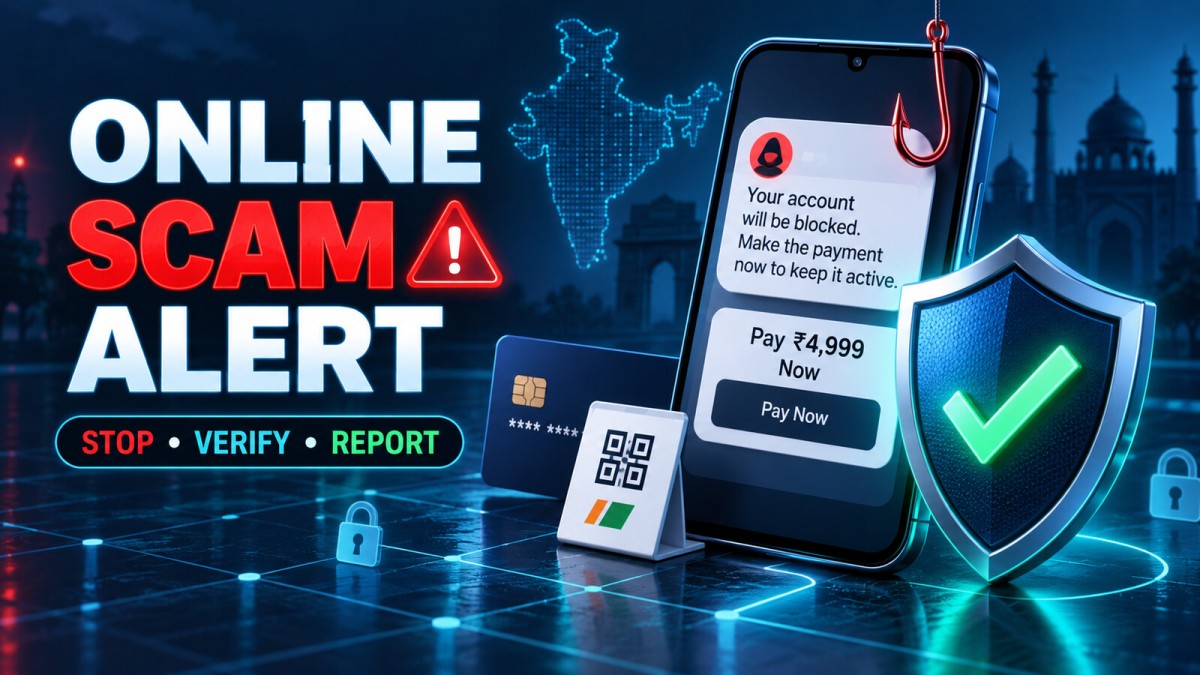
Online scams often succeed because they create urgency, fear, excitement or secrecy. A message may say your bank account will be blocked, a recruiter may promise easy earnings, or a caller may claim that a legal case can be “settled” through an immediate transfer. The stories change, but the pressure is similar: act before you verify.
This guide explains common online scams in India, safer habits for UPI and banking, and practical steps to take after a suspicious interaction. No method can prevent every fraud, but a short pause and an independent verification can stop many rushed decisions.
If Money Has Just Been Sent: Act Immediately
If an unauthorised or fraud-induced payment has just happened, do not spend hours arguing with the scammer. Take these actions promptly:
- Contact your bank, card issuer or payment provider using its official app, card, statement or verified website.
- Ask the provider to record the fraud and take any available protective action on the transaction and account.
- For online financial fraud in India, call 1930 promptly and submit the complaint through the official National Cyber Crime Reporting Portal.
- Preserve messages, numbers, links, transaction IDs, UTR numbers, account details, timestamps and screenshots.
- Secure affected email, banking and social accounts from a trusted device.
Fast reporting may improve the possibility of protective action, but recovery is never guaranteed. Do not pay a person who promises guaranteed recovery, account freezing or police influence.
Why Intelligent People Can Still Be Scammed
Fraud is usually a manipulation problem, not an intelligence test. Scammers combine familiar brands, stolen personal details, caller-ID spoofing, professional language and emotional pressure. A victim may be tired, distracted or already waiting for a delivery, refund or job response.
Common pressure tactics
- Urgency: “Pay in ten minutes or your account will close.”
- Authority: The caller claims to represent a bank, police unit, tax office or large company.
- Scarcity: A product, investment or prize is available only now.
- Fear: The target is threatened with arrest, penalty, account suspension or public embarrassment.
- Reward: Easy income, guaranteed returns, cashback or a prize is promised.
- Secrecy: The target is told not to contact family, bank staff or police.
Recognising the emotion is useful. When a message makes you unusually afraid or excited, pause and verify through a separate channel.
Common Online Scams in India
Fake bank, KYC and account-blocking messages
A message may claim that KYC has expired or an account will be blocked. The link opens a page that copies the bank's colours and logo, then asks for login details, card information, OTPs or a payment.
Do not use the link or phone number in the message. Open the bank's official app yourself or call the number printed on the card or published on the verified bank website.
UPI collect-request and QR-code scams
A fraudster may say that you must scan a QR code or enter a UPI PIN to receive a refund, prize or payment. In ordinary UPI use, entering a PIN authorises a transaction from your account; treat every approval screen as a payment decision. Read the payee and amount before confirming.
Decline unexpected collect requests. Do not rely on a profile photo, payment screenshot or the caller's explanation. Check the actual transaction status inside your bank or UPI app.
Fake customer-support numbers
Scammers publish unofficial helpline numbers in search results, comments or social posts. They may ask the caller to install a screen-sharing app, share an OTP or make a “verification” payment.
Use support details from the official app, your card, invoice or verified company website. A genuine-looking logo beside a phone number is not proof.
Remote-access and screen-sharing fraud
A caller may ask you to install an unfamiliar support app or enable accessibility, notification, screen-sharing or device-administration access. These permissions can expose sensitive screens or allow control over the device.
Do not install software at an unexpected caller's instruction. If you already did, disconnect the device from the internet, avoid sensitive transactions on it and use another trusted device to contact your bank and secure important accounts.
Job and task scams
These schemes promise easy money for rating products, liking videos, placing orders or completing simple online tasks. Small early payments may be used to build trust. The operator then asks for a deposit, tax, recharge or upgrade to unlock larger tasks or withdraw supposed earnings.
A legitimate job should not require you to send money to receive wages. Be especially cautious about private groups showing manufactured profits and constant pressure from supposed members.
Investment, trading and cryptocurrency scams
Fraudsters may promise guaranteed returns, insider tips, automated profit or a special trading account. A fake dashboard can display gains that do not exist. When the victim tries to withdraw, new fees or taxes appear.
High returns without meaningful risk are a warning sign. Verify the entity independently through the relevant regulator and never treat screenshots, celebrity images or group testimonials as evidence. Deepfake audio and video can also be used in promotions.
“Digital arrest” and impersonation threats
A caller may claim that a parcel, SIM, bank account or identity document is linked to a crime. The victim is moved to a video call, shown fake documents and instructed to remain isolated or transfer money to a “safe” or “verification” account.
Do not transfer funds to prove innocence or protect an account. End the call and independently contact the relevant organisation or local police through official details. Pressure to stay on a continuous video call or keep the matter secret is a serious warning sign.
Fake shopping and delivery scams
A website or social seller may advertise an expensive product at an unbelievable discount, request payment outside the marketplace and then disappear. Delivery messages may request a small fee through a phishing page.
Check the exact web address, independent business information, return terms and payment protections. HTTPS encrypts the connection; it does not prove that the seller is honest.
Refund and overpayment scams
A caller may claim to send a refund and ask you to share your screen, approve a request or return an accidental overpayment. Fake screenshots and edited SMS messages can make the transfer appear real.
Verify the balance and transaction directly in your official banking app. Do not send money back based only on a message or screenshot.
Account takeover and friend-in-need messages
A compromised social or messaging account may ask contacts for urgent money. The name and profile photo are familiar, but the request is controlled by someone else.
Call the person using a number you already know or ask a question only they can answer. Do not verify through the same compromised chat.
Loan-app and fee scams
Some apps or agents promise instant loans but demand processing, insurance or release fees before providing funds. Others may request excessive permissions or misuse contact and photo data.
Verify the lender and its regulated relationship independently, review permissions and terms, and avoid sending advance fees to personal accounts. Do not borrow through an app installed from an unknown link.
Romance and relationship scams
A person builds emotional trust online and later requests money for travel, medical problems, customs, investment or an emergency. The relationship may continue for weeks or months before the request.
Refusal to meet safely, repeated emergencies, inconsistent identity details and requests for secrecy deserve attention. Never send money or sensitive documents because emotional pressure makes verification feel disloyal.
Deepfake voice and video impersonation
AI-generated audio or video can imitate a relative, executive or public figure. A realistic voice is no longer enough to verify identity. For urgent payment or confidential requests, call back on a known number and use a family or workplace verification phrase.
A Five-Step Verification Method
- Stop: Do not click, pay, install or share information while under pressure.
- Separate: End the call or leave the chat. Do not use supplied contact details.
- Open: Access the official app or type the known website address yourself.
- Confirm: Contact the person or organisation through a trusted channel.
- Report: Save evidence and report suspicious or fraudulent activity promptly.
A search result is not automatically official. Sponsored results, lookalike domains and copied support pages can appear convincing. Check the domain carefully and use bookmarks or details already provided by the organisation.
UPI and Digital Payment Safety
- Read the recipient name and amount on the final confirmation screen.
- Do not share a UPI PIN, OTP, card PIN, CVV or recovery code.
- Decline collect requests you did not initiate or understand.
- Do not scan a QR code merely because someone says it will credit money.
- Check transaction status in the official app rather than trusting a screenshot.
- Use device lock and app-level security.
- Keep transaction alerts enabled and review them promptly.
- Set practical transaction limits where your provider offers them.
- Avoid payments while an unknown person can view or control your screen.
- Use official support channels for failed or disputed transactions.
The Reserve Bank of India's consumer awareness resources include safe digital banking and cyber-security guidance. Check current instructions from your bank or payment provider because app controls and dispute processes can change.
Protect Your Important Accounts
Use unique passwords
A password reused across services allows one breach to affect several accounts. Use a reputable password manager to create and store unique passwords. Protect the password manager itself with a strong master password and available multi-factor authentication.
Enable multi-factor authentication
Turn on multi-factor authentication for email, banking, social media, cloud storage and other important accounts. Prefer stronger available methods supported by the service. Never approve a login prompt you did not initiate.
Secure your email first
Email often controls password resets for other services. Review recovery details, forwarding rules, signed-in devices and recent security activity. Remove anything unfamiliar.
Keep devices updated
Install operating-system and app updates from official sources. Remove unused apps, review permissions and avoid modified or cracked software. Back up important information so a device problem does not force a rushed recovery decision.
Safer Browsing and Messaging Habits
- Inspect the complete domain, not only the logo or page design.
- Be cautious with shortened links and unexpected attachments.
- Do not sign in through a link received during an urgent conversation.
- Check whether the message style, timing and request match the sender.
- Limit publicly visible personal details that can support impersonation.
- Do not post transaction screenshots containing account or reference details.
- Use separate verification for changes in bank or payment instructions.
Protect Family Members and Older Adults
Scam prevention works better as a shared routine than as a warning delivered after a loss. Agree that any unexpected request involving money, OTPs, remote-access apps, police threats or secrecy should be discussed with another family member first.
Create a family verification phrase for urgent calls. Help relatives save official bank numbers, enable alerts and understand that caller ID and video can be faked. Avoid blaming someone who reports a mistake; shame can delay the urgent steps needed to protect accounts.
Safety for Small Businesses
Businesses face invoice fraud, fake vendor updates, account takeover and impersonation of owners or managers. A criminal may study public information before sending a believable request.
- Verify bank-detail changes using an already-known contact method.
- Require a second approval for unusual or high-value payments.
- Limit who can create payees and release funds.
- Use role-based access and remove former staff promptly.
- Protect business email with multi-factor authentication.
- Train staff to report suspicious requests without fear of punishment.
- Maintain offline contact details and an incident-response checklist.
What to Do After Clicking a Suspicious Link
Clicking alone does not always mean an account or device is compromised. The next steps depend on whether you entered credentials, approved permissions or downloaded a file.
- Close the page and do not continue entering information.
- If you entered a password, change it on the official service from a trusted device.
- Sign out unfamiliar sessions and secure the associated email account.
- If you downloaded a file, do not open it; remove it and run trusted security checks.
- Review recent transactions, login alerts and account changes.
- Contact the service through an official channel when sensitive data was exposed.
What to Do After Installing a Suspicious App
- Disconnect the affected device from mobile data and Wi-Fi.
- Use another trusted device to contact banks and secure important accounts.
- Record the app name, source and permissions before removal when safe.
- Remove remote-access, accessibility, notification and device-administrator privileges.
- Uninstall the suspicious app and run trusted security checks.
- Consider professional help or a device reset when compromise may persist.
- Change exposed passwords and monitor financial activity.
Do not perform banking on a device while an unknown person can see the screen or control input.
How to Report Cyber Financial Fraud in India
The Government of India's National Cyber Crime Reporting Portal provides official channels for financial fraud and other cybercrime complaints. The portal advises people reporting financial fraud to keep bank, wallet or merchant details, the transaction ID or UTR number, date and other supporting information ready.
Information to preserve
- Your bank or payment provider and affected account
- Transaction ID, UTR, amount, date and time
- Beneficiary name, account, UPI ID or wallet details
- Phone numbers, email addresses and social handles
- Website and app links
- Messages, call logs, audio, screenshots and files
- Timeline of what happened
- Complaint and acknowledgement numbers
Use 1930 for prompt reporting of online financial fraud and file the complaint at cybercrime.gov.in. Continue following up with your bank and relevant authorities. Do not share evidence publicly if it exposes sensitive account or identity information.
Beware of Recovery Scams
After a fraud, victims may receive messages from people claiming they can recover money for an advance fee. Some impersonate police, lawyers, banks or technical experts. They may use details from a public complaint to appear genuine.
No stranger can guarantee recovery. Verify every follow-up independently and do not provide remote access, OTPs or new payments. Use the acknowledgement and official channels from your original report.
A 30-Minute Response Checklist
| Time | Priority action |
|---|---|
| First 5 minutes | Stop communication, contact the bank or provider and preserve transaction details |
| Next 10 minutes | Call 1930 for online financial fraud and begin the official portal complaint |
| Next 10 minutes | Secure email, banking and payment accounts from a trusted device |
| Final 5 minutes | Organise evidence and notify trusted people who may also be targeted |
This sequence is a practical guide, not a guarantee or substitute for instructions from your financial institution or authorities.
Monthly Digital-Safety Checklist
- Review banking, UPI and card transactions.
- Check important accounts for unfamiliar devices or sessions.
- Update devices and apps from official sources.
- Remove unused apps and unnecessary permissions.
- Confirm backups can be accessed.
- Review privacy on social profiles.
- Discuss one current scam pattern with family or staff.
- Verify that recovery phone numbers and email addresses are current.
Frequently Asked Questions
Can a professional-looking website be fake?
Yes. Design, reviews, logos and security symbols can be copied. Verify the domain, business and payment process independently.
Does HTTPS mean a website is genuine?
No. HTTPS protects the connection between your browser and the site. A fraudulent site can also use HTTPS.
Should I share an OTP with bank support?
No. Do not share OTPs, UPI PINs, card PINs, CVVs, passwords or recovery codes with a caller or message sender.
Can I receive money by entering my UPI PIN?
Treat any request to enter a UPI PIN as authorising an action from your account. To receive an ordinary incoming payment, do not follow a stranger's instruction to approve a collect request or scan a payment QR code.
What if an urgent money request comes from a friend?
Their account may be compromised. Call them through a number you already know and verify outside the chat.
Does clicking a link mean my phone is hacked?
Not necessarily. Risk increases if you entered credentials, downloaded files, installed an app or granted permissions. Close the page, secure exposed accounts and review the device.
Can money lost to cyber fraud always be recovered?
No. Report immediately because timely action may help, but no bank, authority or recovery service can guarantee a refund.
Where should online financial fraud be reported in India?
Contact your bank or payment provider immediately, call 1930 and submit the complaint through the National Cyber Crime Reporting Portal at cybercrime.gov.in.
Final Takeaway
The most useful anti-scam habit is simple: stop, separate and verify. Do not make a payment, share a secret code or install an app while an unexpected caller controls the pace. Open the official service independently, confirm the request through a trusted channel and report suspicious activity quickly. Protecting accounts is important, but creating a family or workplace verification routine can prevent the emotional pressure that scammers rely on.
Official Indian Resources
- National Cyber Crime Reporting Portal, Ministry of Home Affairs
- Reserve Bank of India: RBI Kehta Hai Consumer Awareness
Disclaimer: This article provides general educational information and does not replace instructions from your bank, payment provider, police, cybercrime authorities or qualified legal and security professionals. Fraud methods and reporting procedures can change. Use current official channels and never rely on a promise of guaranteed recovery.
What's Your Reaction?
 Like
0
Like
0
 Dislike
0
Dislike
0
 Love
0
Love
0
 Funny
0
Funny
0
 Wow
0
Wow
0
 Sad
0
Sad
0
 Angry
0
Angry
0

Software developer with expertise in full-stack web development and financial market analysis, specializing in building tracking tools for trading metrics.






Comments (0)