

How to Build a Social Media Poster Maker with Flutter: Architecture Guide
Learn how to architect a Flutter social media poster maker with editable layers, canvas gestures, text tools, image handling, export, storage, sharing and performance testing.
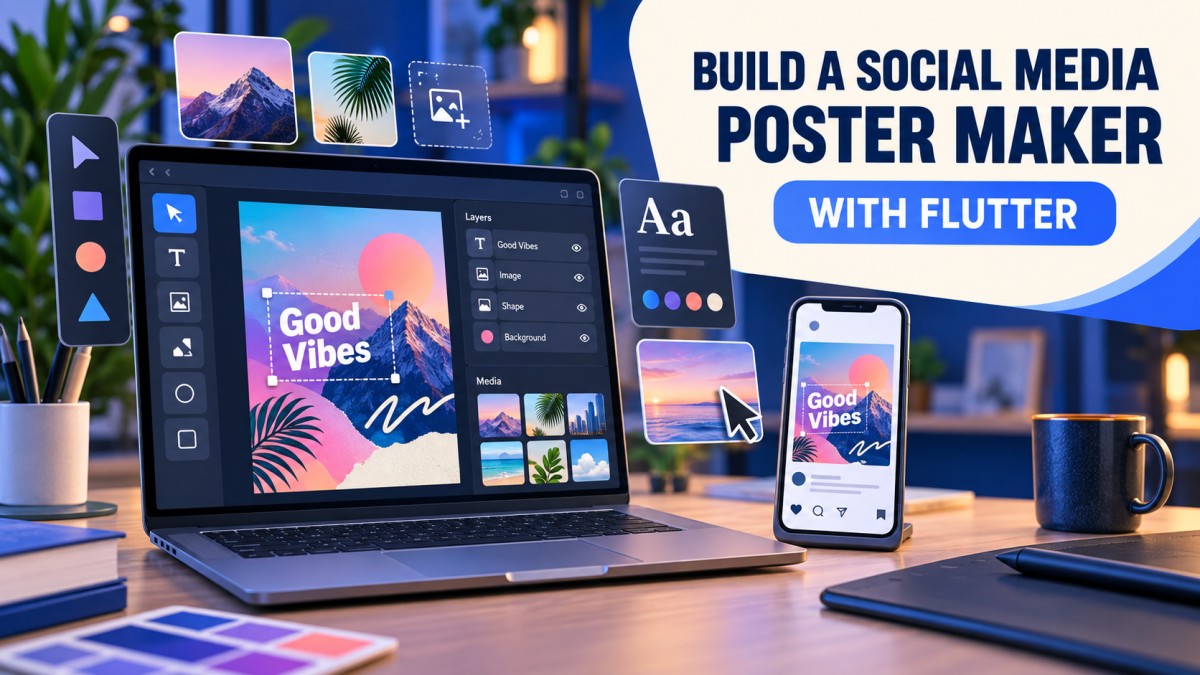
Building a social media poster maker looks simple until the first real user tries to move a text box, replace an image, undo a change and export the design at a sharp resolution. A production app is not just a screen with a few buttons. It is a small design system with a document model, a canvas, editing tools, asset handling, export logic and reliable state management.
Flutter is a strong choice for this type of product because the same codebase can support Android, iOS and other platforms. The difficult part is deciding what belongs to the editor, what belongs to the document data and what should happen only during export. This guide explains that architecture in practical terms, without assuming that every poster maker needs a large design framework.
What a poster maker needs to solve
A useful poster editor normally lets a user choose a canvas size, add text, place images, use shapes or stickers, change colors and export the final design. A social-media-focused product may also need preset sizes for posts, stories, thumbnails and banners.
- A document that stores the background, canvas size and layer order.
- An editor that displays and edits those layers with predictable gestures.
- Tools for text, images, shapes, stickers, alignment and spacing.
- Undo and redo that feel reliable after every important change.
- An export pipeline that produces a clean bitmap or file at the requested size.
- Safe asset storage, sharing and optional cloud backup.
These features are connected. If the app stores only the final screenshot, it cannot properly edit one text layer later. If it stores the document but ignores the canvas coordinate system, designs can shift when the preview size changes. The document model should therefore be designed before the toolbar.
Choose a document model before building the UI
The editor should treat a poster as structured data rather than as a collection of pixels. A simple document can contain a canvas definition and an ordered list of layers:
PosterDocument
  canvas: width, height, background
  layers: [
    TextLayer,
    ImageLayer,
    ShapeLayer,
    StickerLayer
  ]
Every layer should have a stable identifier, position, size, rotation, opacity, visibility and lock state. Text layers also need font, color, alignment, letter spacing and line height. Image layers need a local or cloud asset reference, crop information and possibly a filter or opacity value.
Keeping these properties in data makes important features much easier. The layer list can drive the sidebar, the canvas can render from the same list, and export can use the same document without depending on whatever happens to be visible on screen.
A practical Flutter screen structure
A clean screen can be divided into four parts: a top bar for undo, redo and export; a central canvas workspace; a layer or object panel; and a bottom tool panel for adding or editing items.
Use a Stack for the visible canvas when each object needs its own gesture handling. A background layer can sit below the editable objects, while a selection overlay stays above them. The overlay should be responsible for handles and guides, not the individual text or image widgets.
A possible widget hierarchy is:
Scaffold
  AppBar
  Column
    Expanded
      Center
        RepaintBoundary
          AspectRatio
            Stack
              Background
              PosterLayer widgets
              SelectionOverlay
    ToolPanel
The exact hierarchy may change with your design, but the separation is useful: tool buttons change the document, layer widgets render the document, and the selection overlay manages the current selection.
Use one coordinate system for preview and export
Coordinate bugs are among the most visible problems in a poster maker. A design may look correct in the editor but move or resize after export if screen pixels are mixed with document pixels.
Store layer positions in document coordinates. For a 1080 × 1350 poster, the layer position should be based on that document size even when the preview is only 360 pixels wide. The editor calculates a scale factor to display the document:
scaleX = previewWidth / documentWidth
scaleY = previewHeight / documentHeight
When the canvas keeps its aspect ratio, use the smaller scale and centre the remaining space. Convert pointer coordinates back into document coordinates before changing a layer. This keeps a design stable when the device rotates, the preview changes size or the same document is opened on another device.
Do not save a layer as “left: 120 pixels on this phone.” Save it as a document position. That single decision prevents many responsive-layout and export bugs.
Build selection and gestures deliberately
Users expect a selected object to move, resize and rotate without accidentally editing a different object behind it. A reliable interaction model should define which gesture has priority:
- Tap selects the topmost unlocked layer under the pointer.
- Drag inside the selection moves the layer.
- Corner handles resize it while preserving the chosen aspect ratio.
- A rotation handle changes the angle around the object’s centre.
- Pinch and rotate gestures can work on touch devices when they are not fighting a handle gesture.
- Locked or hidden layers cannot be changed from the canvas.
Use the actual transformed bounds when hit-testing a rotated object. Checking only its unrotated rectangle produces confusing selections, especially for diagonal stickers and text boxes. Also consider a minimum touch target around small handles so that users do not need pixel-perfect fingers.
Text tools need a real text model
Text is usually the most-used part of a social poster maker. Store the text content separately from its style and layout. This allows the editor to update one property—such as font size—without rebuilding unrelated layers.
Useful text controls include font family, size, weight, color, alignment, line height, letter spacing, shadow, outline and background. Curved or three-dimensional text can be added later, but the basic text layer should be dependable first.
Measure text before drawing selection handles. Flutter’s text layout tools can calculate the rendered size for a given style. The selection box should follow the measured text rather than an arbitrary fixed rectangle. When the text changes, update the layer bounds and keep the object’s centre or chosen anchor stable.
For custom fonts, bundle only the fonts you are licensed to distribute. A poster app that lets users export designs should also make it clear when a font or template has usage restrictions.
Image layers, cropping and transparent assets
An image layer should keep the original asset reference and a crop transform instead of permanently destroying the source image every time the user drags it. That makes replace, reset and non-destructive editing possible.
For a good image workflow, support:
- Fit and fill modes for placing an image inside a frame.
- Pinch zoom and pan while cropping.
- Rotation and horizontal or vertical flip.
- Opacity, brightness and simple filters where performance allows.
- Transparent PNG or WebP assets with correct alpha handling.
- A low-resolution preview with the original asset reserved for export.
Very large photos can make the editor slow or cause memory pressure. Decode a preview near the displayed size and load the original only when it is needed for a high-resolution export. Always test a design containing several large images, not just a single small icon.
Undo and redo should record meaningful actions
A user should be able to undo a move, resize, text edit or deletion without seeing half-finished gesture states. The easiest approach is to record document changes as commands or immutable snapshots.
For example, a move gesture can update the visual position continuously, but add one undo entry when the gesture ends. A text field may update while the keyboard is open, but the history should group that editing session into a meaningful action instead of creating one undo step per character.
Keep two stacks: an undo stack and a redo stack. A new edit pushes to undo and clears redo. Undo moves the latest state to redo; redo moves it back to undo. Test the sequence after adding, deleting, reordering and replacing layers, because history bugs are especially frustrating in creative tools.
Export the document through a dedicated pipeline
The editor preview is not always the final output. It may be displayed at a small size, contain selection handles or use preview-quality images. Export should render the document separately at the requested width and height.
A RepaintBoundary can be useful for capturing a Flutter widget, but it must be configured carefully. If the output is larger than the preview, use an appropriate pixel ratio or render from the document model at the target dimensions. Never include selection borders, toolbars or gesture handles in the exported image.
Before saving, check:
- The output width and height match the selected preset.
- Text is not clipped at the edges.
- Transparent backgrounds remain transparent when requested.
- Images are not accidentally stretched.
- Colors look consistent on a real device and in the saved file.
- The file is written to a location the user can actually access.
Export can be expensive on older phones. Show progress for a large design, avoid creating unnecessary intermediate bitmaps and release temporary memory after the file is saved.
Offline assets and cloud storage
A poster maker can work offline for templates, bundled fonts and local editing. Offline support is valuable because users may be travelling or working with an unstable connection. Keep the document and local asset references together so a draft can reopen without the network.
Cloud storage is useful for backup and multi-device access, but it introduces account, privacy and conflict questions. Decide whether the cloud stores the editable document, the exported image or both. Use authenticated access rules, validate file types and avoid making private user designs publicly readable by default.
If a user deletes an asset from cloud storage, the document should show a clear missing-asset state rather than failing silently. A small thumbnail cache can improve browsing, while the original asset remains protected behind the user’s account.
Sharing to social platforms
Start with the normal system share sheet. It is easier to maintain than building a separate integration for every platform, and it lets users choose an installed app. Generate the file, confirm that it exists, then pass it to the platform share mechanism.
Direct publishing integrations require platform-specific permissions, app-review requirements and token handling. Never store social access tokens in plain text or expose them in logs. Explain why each permission is needed, let users disconnect an account and provide a way to remove stored connection data.
Also remember that a social platform may recompress an image or apply its own crop. Offering a few common aspect-ratio presets helps users create designs that survive that process.
Performance habits that matter
A canvas can become slow when every small change rebuilds every layer. Keep state granular where possible, avoid unnecessary work in build, and use repaint boundaries around expensive areas. A custom painter is helpful for drawing, but it should still receive only the data it needs.
- Use stable keys for layer widgets.
- Do not decode full-size images for tiny thumbnails.
- Throttle expensive filter previews during a drag.
- Use a lightweight selection overlay instead of rebuilding the whole document.
- Profile on a lower-end Android device, not only on a development laptop.
- Test long documents with many layers and repeated undo/redo actions.
Flutter’s official performance guidance is a useful reference when the editor starts dropping frames. Measure first; a visually complex screen is not automatically slow, and a simple screen can still contain an expensive rebuild.
Testing a poster maker before release
Creative apps need more than a successful launch screen test. Test the document model, gestures, export and recovery paths separately.
- Create, rename, lock, hide, reorder and delete several layers.
- Open a saved draft after the app is killed.
- Rotate the device and verify that layer positions remain correct.
- Paste long text and check wrapping, clipping and font fallback.
- Export with no network connection and with a large image.
- Try invalid or missing asset files.
- Run undo and redo through a mixed sequence of edits.
- Test accessibility labels, contrast and touch targets.
Keep a few reference designs as visual regression tests. If an update changes the export position of text or a logo, comparing the output image makes the problem easier to find than relying on a manual memory of how it looked.
A sensible development roadmap
- Foundation: create the document model, canvas presets and a background layer.
- Core editing: add selection, move, resize, rotate, delete and layer ordering.
- Content tools: add dependable text, image and shape layers.
- History: implement undo and redo before adding advanced effects.
- Export: create high-quality PNG or JPEG output and test multiple presets.
- Storage: add local drafts, asset cleanup and optional backup.
- Polish: add templates, filters, sharing, accessibility and performance improvements.
This order keeps the risky parts visible early. It is better to have a small editor with reliable layers and export than a large toolbar built on top of a fragile canvas.
Frequently asked questions
Is Flutter suitable for a poster maker app?
Yes. Flutter can provide a shared UI and gesture system for Android and iOS. The main engineering work is the editor architecture, image memory management and export pipeline rather than the basic ability to draw widgets.
Should the poster be stored as an image or JSON?
Store an editable document as structured data, such as JSON or a local database record, and generate an image during export. Keeping only a flat image prevents users from editing individual layers later.
Which widget is best for a canvas editor?
A Stack works well when each layer needs independent interaction. CustomPainter is useful for guides, backgrounds and specialised drawing. Many mature editors use a combination instead of forcing every feature into one widget.
How do I prevent exported text from moving?
Store positions in document coordinates, calculate the preview scale consistently and render export from the same document model. Avoid saving screen-pixel positions that depend on one device’s size.
How many layers should the app support?
There is no universal number. Set a practical limit based on testing and device performance, but do not choose a limit before measuring memory and frame rate with realistic photos and effects.
Can users publish directly to Instagram or Facebook?
It may be possible through supported platform flows, but permissions, review rules and APIs change. Start with the operating system share sheet, then add direct integrations only after reviewing the current requirements of each platform.
Should the app work without internet?
Offline editing is a useful feature. Bundle essential templates and keep local drafts available, then make cloud backup an optional layer with clear account and privacy controls.
Final takeaway
A good Flutter poster maker is built around a dependable document model, not around a crowded toolbar. Keep layer data separate from rendering, use one coordinate system, group undo actions, render export at the target size and test the app with real devices and large assets. Once those foundations are stable, templates, advanced text effects and social integrations can be added without constantly rewriting the canvas.
For current Flutter APIs and platform guidance, check the official Flutter documentation and its performance best-practices guide.
Last reviewed: September 2026
This article is for general educational purposes. Package APIs, platform policies and operating-system behavior can change, so verify current documentation before shipping an app.
Frequently Asked Questions
What's Your Reaction?
 Like
0
Like
0
 Dislike
0
Dislike
0
 Love
0
Love
0
 Funny
0
Funny
0
 Wow
0
Wow
0
 Sad
0
Sad
0
 Angry
0
Angry
0

Software developer with expertise in full-stack web development and financial market analysis, specializing in building tracking tools for trading metrics.







Comments (0)